
Ask Viewpoint
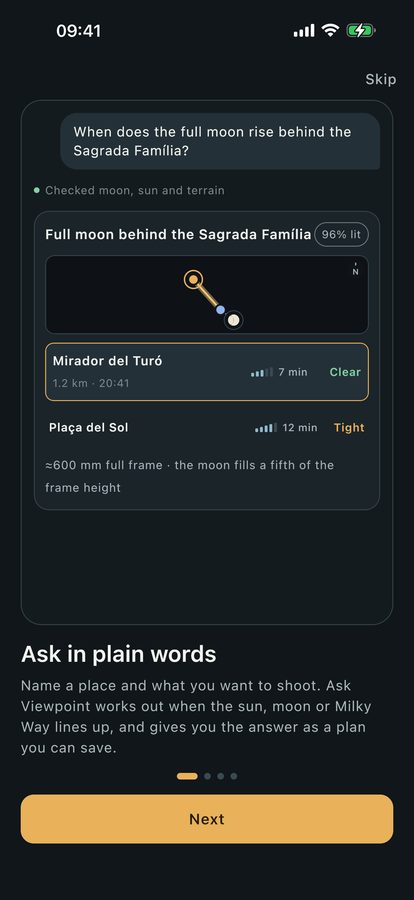
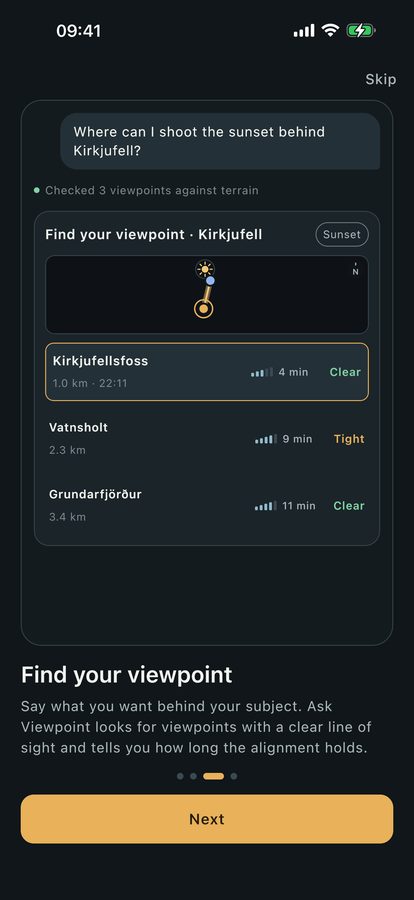
Coming to Ultra. Ask Viewpoint lets you plan a photograph by asking for it in your own words. Say what you want to shoot, where and roughly when, and Viewpoint works it out with the same tools you use in the app: the planner, the 3D world, the conditions and the calculators. Just ask.
What you can ask
Anything Viewpoint does. Planning a shot is where it is strongest.
- Where to stand and when. Which viewpoint to shoot from, and the date and time the sun, the moon or the Milky Way core lines up with your subject.
- Weather and cloud. The forecast for a place, up to 15 days ahead.
- Conditions. Fog, afterglow, clear nights, darkness and the other conditions Viewpoint watches.
- The aurora and sky events. Whether tonight is worth staying up for, and what is coming up in the sky.
- A calculation. Depth of field, hyperfocal distance, exposure, star trails and the rest of the calculators, worked out for your camera and lens.
- Your own plans and alerts. What you saved, and what is coming up for it.
- How the app works. Where something is, and how to use it.
Ask Viewpoint does not answer questions about tides.
Example questions
- “Where do I stand to photograph the full moon behind this castle?”
- “When does the Milky Way core line up with the lighthouse this summer?”
- “Is there a chance of fog in the valley on Saturday morning?”
- “What aperture do I need to keep the rocks and the mountain sharp at 24 mm?”
- “Is the aurora worth going out for tonight?”
Where the answers come from
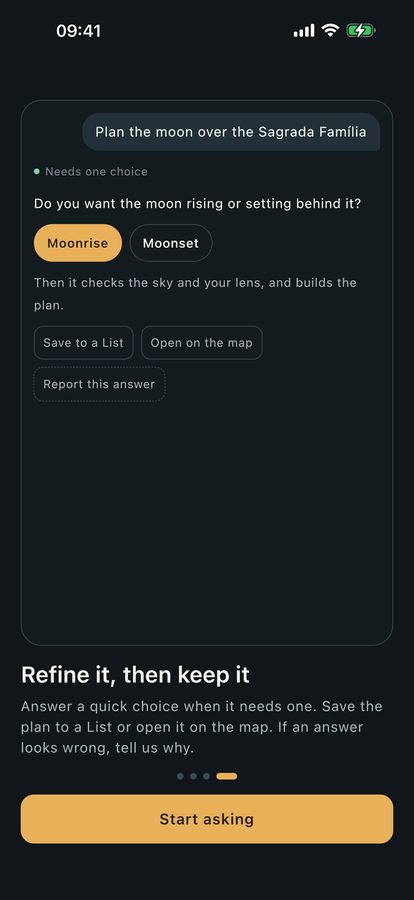
Times, dates, angles and distances in an answer come from Viewpoint’s own tools, the same ones that power the planner and the calculators. When an answer proposes a plan, you can open it in the app, check it in 3D and keep it.
When an answer used the hyperfocal calculator, the forecast or the sun and moon times, a small tool card sits under it with that tool’s own figures: for example Focus at, Sharp from and Sharp to for hyperfocal, Cloud, Wind and Temp for an hour’s forecast, or the sunrise, sunset, moonrise and moonset for a day. Tap Open in Hyperfocal, Open in Conditions or Open in Sun & Moon to open that tool in the app with the same lens, place and time already set, and change anything there. If your question left out something the tool needs (a focal length, say), or the forecast couldn’t be read, the card says so and still opens the tool. A forecast card in an older chat keeps the figures it was answered with and notes that the forecast may have changed since. The cards are kept with the chat, so they read offline. On the web the cards come with the Ask panel.
Some answers also show a From Google Maps box after the answer and its plan. What is inside it is Google Maps’ own information, shown exactly as Google wrote it, with each place it names as a row. Tap a row to open that place in Google Maps (the Google Maps app if you have it, otherwise your browser). The box ends with the Google Maps attribution. It is kept apart from Viewpoint’s answer: copying or sharing the answer leaves it out, and a Not right? report is about Viewpoint’s answer only. When Google Maps has nothing to add, or can’t be reached, there is no box.
If an answer is wrong, tap Not right? under it and tell us why. We use that to make Ask Viewpoint better.
Answers are generated by AI
Ask Viewpoint writes each answer with an AI model, from Viewpoint’s own engines and data. Every answer is marked AI; tap the mark to see what that means. Answers can be wrong, so double-check times and places before you go. When you copy an answer, the copied text ends with “Generated by AI in Viewpoint”.
Your chats
Every chat is kept on your device, under Recents.
- The ⋯ at the top of a chat pins it to the top of Recents, renames it, archives it or deletes it (you’re asked first). It also has This is wrong, which reports the latest answer so you can tell us why.
- Plans & places sits above the box you type in once a chat has made something for you. It shows how many things there are. Tap it to see them all in a sheet that opens halfway; drag it up to see more. You’ll find the plan cards the answers drew, the Plans you saved from them, your Locations the answers named, and the other places they mentioned, newest first. Tap a plan card to jump back to it in the chat, a Plan or a Location to open its page, or a place to open it in Explore. The list works offline too, because it is built from what is already on your device.
When you step away
An answer can take up to half a minute. You don’t have to wait on the chat: lock your phone or switch apps, and Viewpoint finishes the answer for you. If it is ready while you are away, a notification tells you, titled with the chat’s name: “Your answer is ready”, or “Ask Viewpoint has a question for you” when it needs your reply. The notification never shows the answer itself. Tap it to open that chat with the answer in place. Only the phone or tablet you asked on is notified. To turn these off, use Settings → Notifications → Ask answers. The web app does not send these notifications.
Availability
Ask Viewpoint is coming to Ultra in the iPhone and iPad app, in the Android app and in the web app, where Ask in the side panel opens the chat beside the map. The first time you open it, a short guide shows what you can ask.
Ask Viewpoint isn’t available in every region. Where it isn’t, the app says so in its place, and everything else in Viewpoint works as usual.
Uses credits: a monthly allowance comes with Ultra; top-ups in the app. See how credits work.